Free AI AWS Code Converters
Paste AWS code and get it back in the SDK, language or infrastructure-as-code format you need. Migrate from AWS SDK for JavaScript v2 to v3, turn Terraform into AWS CDK, move CloudFormation templates to Terraform, or draft an IAM policy from the API calls in your code. All 19 tools are free and need no signup.
All AWS GenAI tools
JavaScript & TypeScript 4
Rewrite aws-sdk v2 calls as modular @aws-sdk/client-* clients and commands.
Translate v3 command-style code into v2 syntax to match an older codebase.
AWS SDK JS → Boto3Port Node.js AWS SDK code to Python using boto3 clients.
AWS SDK JS → Rust (Rusoto)Port JavaScript AWS SDK calls to Rust with the Rusoto crates.
Rusoto is in maintenance modePython 3
Infrastructure as code 9
Turn HCL resources into AWS CDK constructs written in TypeScript.
Terraform → CDK (Python)Turn HCL resources into AWS CDK constructs written in Python.
AWS CDK → TerraformExpress CDK stacks as Terraform HCL resources.
CDK TypeScript → PythonSwitch a CDK app from TypeScript to Python.
CDK Python → TypeScriptSwitch a CDK app from Python to TypeScript.
Terraform → CloudFormationGenerate a CloudFormation template from Terraform configuration.
CloudFormation JSON → TerraformConvert JSON CloudFormation templates into Terraform resources.
CloudFormation YAML → TerraformConvert YAML CloudFormation templates into Terraform resources.
Terraform → Pulumi (TypeScript)Rewrite Terraform configuration as a Pulumi program in TypeScript.
IAM policy generators 3
How to use the AWS code converters
Every tool on this page works the same way. Each one opens as a split editor with sample code already filled in, so you can see what it expects before you paste anything.
- Pick the conversion you needSearch above or filter by category, then open the tool that matches your source and target, for example AWS SDK v2 → v3 or CloudFormation YAML → Terraform.
- Replace the sample with your codePaste into the left-hand editor. Start with one file, one Lambda handler, or one stack. Remove secrets and access keys first.
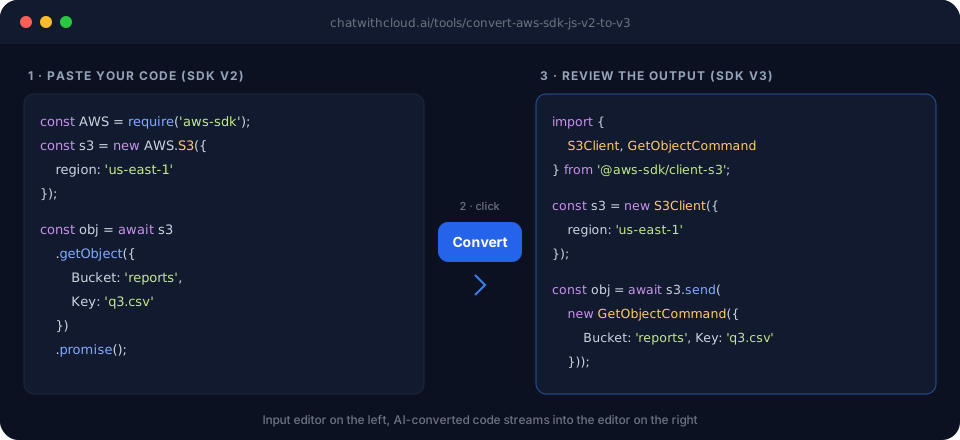
- Click ConvertYour code goes to an AI model, and the converted version streams into the right-hand editor line by line. Longer inputs take a few seconds more.
- Review, copy and testRead the output next to the original, copy it into your project, and run your linter, tests or
terraform plan/cdk diffbefore you ship it.
How these tools help
Most AWS migrations are mechanical but slow: the same import changes, client setup and renamed arguments repeated across dozens of files. These converters produce that first draft in seconds, so you spend your time on the parts that need judgment. They're built for developers, DevOps and platform engineers, and anyone who inherits AWS code written in a stack they don't use day to day.
Migrating from AWS SDK for JavaScript v2 to v3
AWS SDK for JavaScript v2 reached end-of-support on September 8, 2025 and no longer receives updates, including security fixes. The AWS SDK v2 to v3 converter rewrites global AWS.* clients into modular @aws-sdk/client-* imports and client.send(new Command()) calls, one file at a time. For large codebases, pair it with AWS's official v3 migration guide.
Moving between Terraform, CDK, CloudFormation and Pulumi
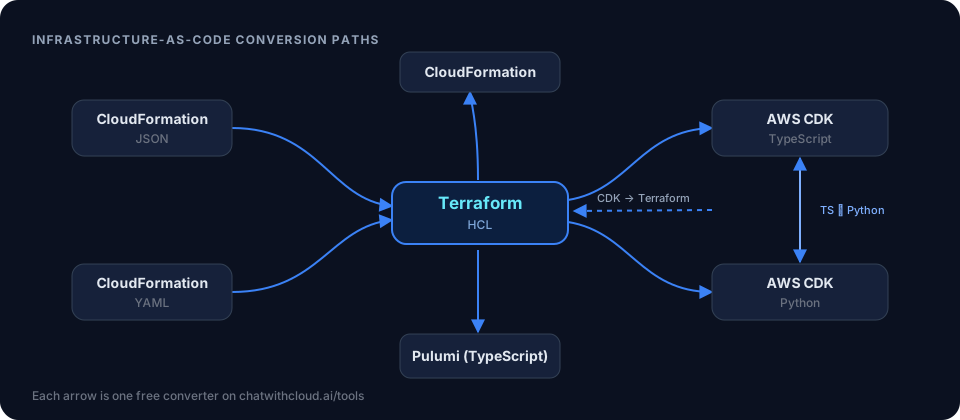
Teams switch IaC tools when they standardize on one stack, adopt a library, or take over another team's infrastructure. The IaC converters cover the common paths: Terraform to AWS CDK in TypeScript or Python, CDK back to Terraform, CloudFormation YAML to Terraform (JSON is supported too), Terraform to CloudFormation, and Terraform to Pulumi.
Porting AWS code between languages
A Python prototype needs to become a Node.js Lambda, or a Go service has to reproduce what a boto3 script does. The cross-language converters (Boto3 to AWS SDK JS v3, Boto3 to Go, and JavaScript to Boto3) map each API call to its equivalent in the target SDK, so you don't have to look up every operation name.
Writing IAM policies for code you already have
Figuring out which permissions a function needs usually means reading every SDK call and translating it into IAM actions by hand. The IAM generators do that pass for you. They're a quicker starting point than AdministratorAccess and a better fit for AWS's least-privilege best practice.
Key features
| 19 focused converters | SDK version upgrades, cross-language ports, IaC conversions and IAM policy generation, with one tool per source and target pair. |
|---|---|
| Side-by-side editor | Syntax-highlighted input and output panes, so you can compare the original and the conversion line by line. |
| Pre-filled sample code | Each tool opens with a working example, so you can see the expected input format before pasting your own. |
| Streaming output | Converted code appears as it's generated, so you can start reading straight away. |
| Free, no account | No signup, API key or AWS credentials. Open a tool and paste your code. |
Tips for getting better results
- Convert in small, complete units. A single handler, module or stack converts more reliably than a whole repository pasted at once.
- Include the imports and client setup. Region, credentials provider and client options tell the model which SDK and style you're using.
- Keep your comments. Comments that explain intent, such as "retry on throttling", help the output keep that behavior.
- Diff before you deploy. For IaC, run
terraform plan,cdk diffor a CloudFormation change set and confirm nothing is being replaced unexpectedly. - Validate generated IAM policies. Run them through IAM Access Analyzer policy validation and replace wildcard resources with specific ARNs where you can.
Common mistakes to avoid
- Pasting secrets. Strip access keys, tokens and passwords from your code before converting it.
- Assuming infrastructure moves with the code. Converting Terraform to CDK doesn't transfer state. Import existing resources with Terraform import blocks or
cdk import, or a deploy may try to create duplicates. - Missing runtime differences. In SDK v3,
GetObjectreturnsBodyas a stream rather than a Buffer, and some error names and pagination helpers changed. Tests catch what a code review misses. - Starting new Rust projects on Rusoto. Rusoto is in maintenance mode. For new work, use the official AWS SDK for Rust.
Examples
These show the kind of conversion each tool produces. AI output can vary slightly in naming and formatting from run to run.
Upgrade an S3 download from SDK v2 to v3
A Node.js service still reads report files with the v2 SDK. The v2 to v3 converter swaps the global client for a modular one and replaces .promise() with send().
const AWS = require('aws-sdk');
const s3 = new AWS.S3({ region: 'us-east-1' });

const obj = await s3
  .getObject({ Bucket: 'reports', Key: 'q3.csv' })
  .promise();
const csv = obj.Body.toString('utf-8');
import { S3Client, GetObjectCommand } from '@aws-sdk/client-s3';
const s3 = new S3Client({ region: 'us-east-1' });

const obj = await s3.send(
  new GetObjectCommand({ Bucket: 'reports', Key: 'q3.csv' })
);
// v3 returns Body as a stream
const csv = await obj.Body.transformToString();
Move a CloudFormation bucket to Terraform
A team adopting Terraform starts with a versioned S3 bucket defined in CloudFormation YAML. Current AWS provider versions configure versioning as its own resource, and the CloudFormation YAML to Terraform converter splits it out that way.
Resources:
  LogsBucket:
    Type: AWS::S3::Bucket
    Properties:
      BucketName: acme-app-logs
      VersioningConfiguration:
        Status: Enabled
resource "aws_s3_bucket" "logs_bucket" {
  bucket = "acme-app-logs"
}

resource "aws_s3_bucket_versioning" "logs_bucket" {
  bucket = aws_s3_bucket.logs_bucket.id
  versioning_configuration {
    status = "Enabled"
  }
}
Because the bucket already exists, import it into Terraform state before your first terraform apply.
Draft permissions for a Python Lambda
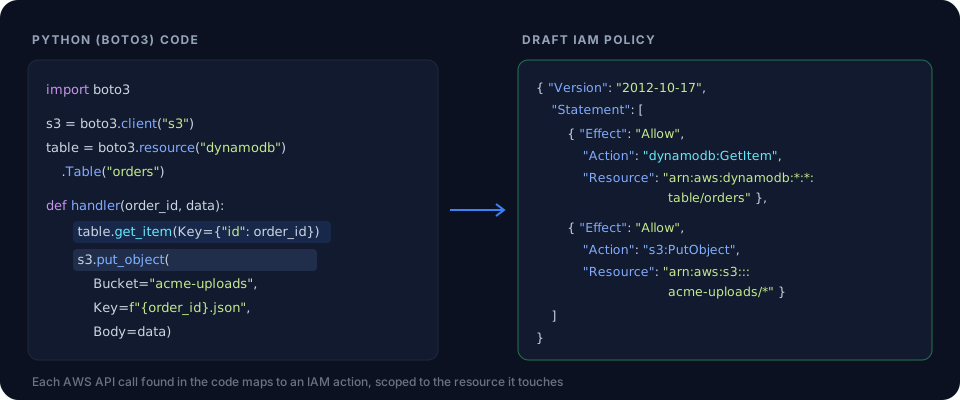
An order-processing Lambda reads from DynamoDB and writes to S3. Paste the handler into the IAM policy generator for Python and you get a policy that allows dynamodb:GetItem on the orders table and s3:PutObject on the uploads bucket, like the diagram above. Replace the * region and account wildcards with your own values before you attach it to the function's execution role.
Frequently asked questions
Are these AWS tools free to use?
Yes. Every converter and IAM policy generator on this page runs in your browser at no cost, and you don't need an account or an API key.
How accurate is AI code conversion?
It handles the repetitive part of a migration well: imports, client setup, renamed resources and argument shapes. Treat the result as a strong first draft. Read it, run your tests, and check anything that depends on runtime behavior, such as streaming response bodies, pagination, retries and error handling.
Is it safe to paste my code into these tools?
Your code is sent through ChatWithCloud's server to an AI model (currently open models hosted on NVIDIA's API, such as NVIDIA Nemotron), which rewrites it. Remove access keys, secrets, passwords and anything else you wouldn't share before you click Convert. Your AWS credentials are never needed.
Does converting Terraform to CDK or CloudFormation migrate my existing infrastructure?
No. The tools convert code, not deployed resources or state. To manage resources that already exist with the new tool, import them: Terraform supports import blocks, and AWS CDK has the cdk import command. Otherwise a deploy may try to create duplicates.
Will the IAM policy generator give me a least-privilege policy?
It gives you a draft that lists the IAM actions your code calls, which is a good starting point. Narrow the resources to specific ARNs, add conditions where they make sense, and validate the result with IAM Access Analyzer policy validation before you attach it.
Is the AWS SDK for JavaScript v2 still supported?
No. AWS SDK for JavaScript v2 entered maintenance mode on September 8, 2024 and reached end-of-support on September 8, 2025, so it no longer receives updates. AWS recommends migrating to v3.
Why does the Rust converter target Rusoto instead of the official AWS SDK for Rust?
The converter outputs Rusoto code. Rusoto is now in maintenance mode, while the official AWS SDK for Rust is generally available. Use the Rusoto output as a guide to structure and API calls, and prefer the official SDK for new projects.
How are these tools different from the ChatWithCloud CLI?
These tools transform code you paste into the page and never touch your AWS account. The ChatWithCloud CLI runs in your terminal, uses your local AWS credentials, and answers questions about your live resources, such as costs, IAM and errors.
Keep going
If you're writing new AWS code rather than converting old code, the practical AWS examples library has ready-to-use snippets, such as uploading a file to S3 with S3Client and invoking a Lambda function with SDK v3. After a migration, you can check what your identity is actually allowed to do with this guide to your current role's IAM permissions. Planning storage costs? Try the S3 pricing calculator.
Questions about your live AWS account?
The ChatWithCloud CLI answers them in plain English from your terminal, from monthly costs to public buckets. The first 15 runs are free.